
What Is the Gemini API, and Which Door Should You Use?
A practical Gemini API guide for teams: AI Studio keys, Gemini 4 model choice, free-tier limits, the 1 December 2026 price change, and Vertex versus Firebase.
Updated 19 min read


A practical Gemini API guide for teams: AI Studio keys, Gemini 4 model choice, free-tier limits, the 1 December 2026 price change, and Vertex versus Firebase.
The Gemini API is Google's first-party developer API, documented in Google AI Studio, for calling Gemini models from your own software through the Interactions API. This guide is for engineers and founders shipping a product on it. It covers authorization keys, the Gemini 4 lineup, and the price and routing changes that take effect on 1 December 2026.
The official docs home ranks first for this keyword, but it is a directory, not a working map. The practical questions are which key type to create, which model code to send, and whether you should stay on the Developer API or move to Gemini Enterprise Agent Platform or Firebase AI Logic.
GEMINI_API_KEY or GOOGLE_API_KEY, and send your first call with the Interactions API and gemini-4-hydrogengemini-2.5-pro and gemini-2.5-flash requests automatically route to newer models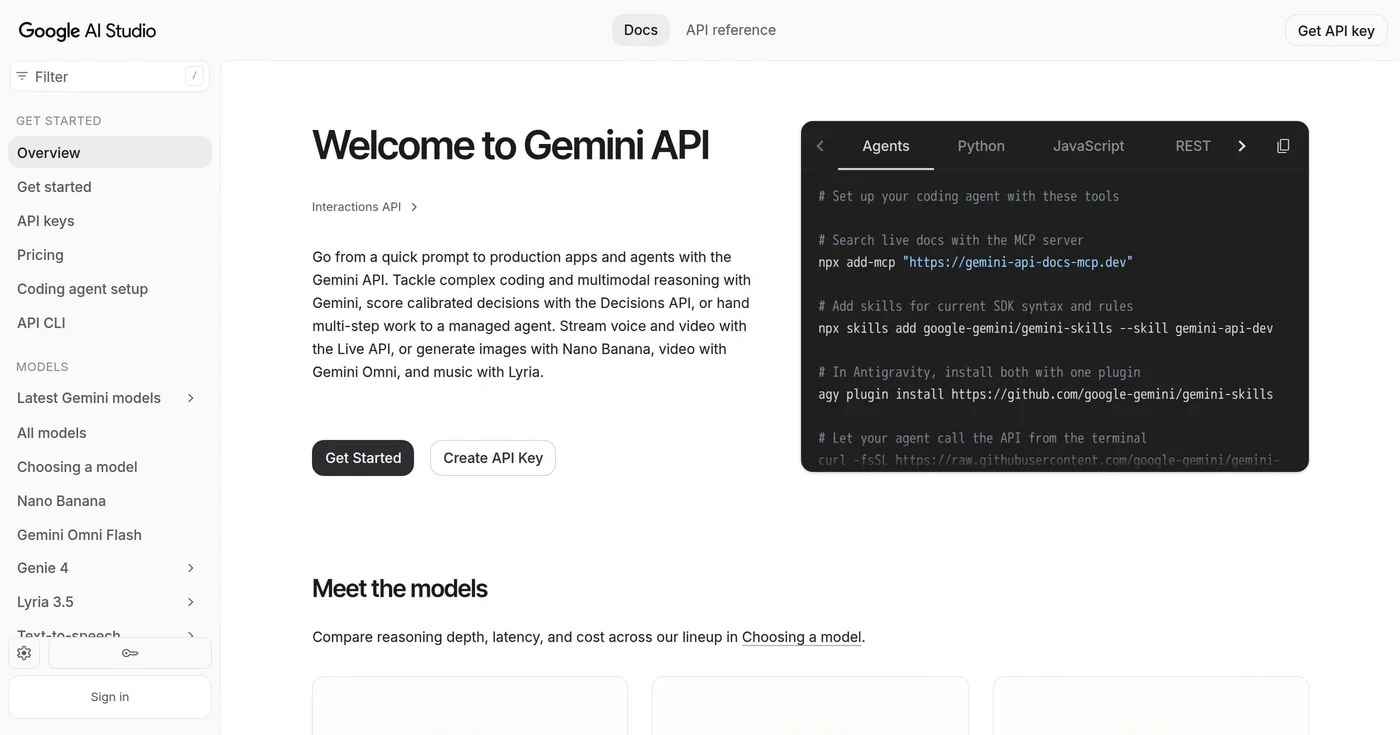
The Gemini API is the first-party way to call Google's Gemini models from your own code. Google documents it under both ai.google.dev and aistudio.google.com/docs. Those URLs serve the same developer documentation.
The surface is broader than a single chat endpoint. The docs home covers text and multimodal reasoning, plus the Decisions API for yes/no and rubric scores. It also covers managed agents, the Live API, Nano Banana images, Gemini Omni video, and Lyria music.
It is not the API for the Gemini cryptocurrency exchange, and it is not automatically the same service as Gemini models on Google Cloud. Those Cloud paths are a separate operating model, covered later.
Most new projects should start with the Interactions API, which is what the official Get started guide uses. The latest official SDKs default to API version v1. The Live API and speech generation still require v1beta, per the API reference.
Teams searching for this API are usually trying to ship, not to browse model cards. The official pages behind that query also change quickly.
The current general-purpose lineup is Gemini 4, with Hydrogen, Neon, Carbon and Argon sharing a 1M-token context window. That is enough to send a large repository slice, a long PDF pack, or a multimodal brief in one request, which changes how you design retrieval. We cover the retrieval side in our RAG guide.
2027 planning also has hard dates already on the calendar. Carbon and Argon prices rise on 1 December 2026, Gemini 2.5 Pro and 2.5 Flash stop being themselves that same day, and introductory Flash prices end on 1 January 2027. If you are still sending last year's model IDs into production, the cutover is a billing and behavior change, not a rename.
A production integration comes down to five decisions: how you authenticate, which model you call, which capabilities you turn on, how you handle quotas and spend, and where the request actually runs.
Create or copy a key in Google AI Studio. New users get a default Google Cloud project and a key after they accept the Terms of Service. If you already have Cloud projects, you import the one you want to use, and some imported projects need verification before they can use the free tier.
Set the key as GEMINI_API_KEY or GOOGLE_API_KEY. If both are set, GOOGLE_API_KEY wins. The official first call from Get started looks like this:
from google import genai

client = genai.Client()

interaction = client.interactions.create(
    model="gemini-4-hydrogen",
    input="Explain how AI works in a few words"
)
print(interaction.output_text)
Install the current official library with pip install -U google-genai, or use @google/genai in JavaScript and TypeScript. The libraries page also lists official Go, Java and C# / .NET SDKs. Legacy packages such as google-generativeai were deprecated as of 30 November 2025 and do not get recent features.
For multi-turn chat, the Interactions API can keep state on the server with previous_interaction_id. That is the official recommended path when you do not want to resend the full history yourself.
The model is a string in the request, and the current starting point in official docs is gemini-4-hydrogen. Choosing a model is the page to trust for "when to use which," with one caveat: Argon is listed on Models and Pricing but is missing from that comparison table.
Every general-purpose Gemini model accepts text, images, audio, video and PDFs. Carbon, Neon and Hydrogen also share built-in tools such as Google Search, code execution, function calling, computer use and structured outputs. They differ in thinking-token spend, speed and price, which is the actual decision.
Multimodal input is the default, not an add-on. Specialized endpoints cover work a general model should not do as a side job.
Use Decision 1 for routing and scoring, Nano Banana for images, and Gemini Omni for short video. Use Live models for voice agents, Lyria for music, and Genie 4 for realtime interactive worlds.
Batch and Flex inference cut token costs by 50 percent for work that can wait. Priority inference puts user-facing traffic on non-sheddable queues, with default rate limits at 0.3 times the standard cap. Grounding with Google Search has its own monthly and daily caps, which we will get to under quotas.
Rate limits are measured in requests per minute, input tokens per minute and requests per day, and they apply per project, not per API key. Requests per day reset at midnight Pacific time. Exceeding any one of those dimensions returns a rate-limit error.
Your project's usage tier sets how high those limits go. Free comes first, then Tier 1 once billing is linked, then Tier 2 and Tier 3 as cumulative Cloud spend crosses official thresholds. Spend-based limits also apply on a rolling 10-minute window.
The public rate-limits page does not publish per-model RPM figures for Gemini 4. Those live in the AI Studio rate-limit view, and Google says they are not guaranteed.
The same Google GenAI SDK can target more than one backend. The Developer API is the AI Studio key path this guide is about. Gemini Enterprise Agent Platform is the Google Cloud path, with provisioned throughput, IAM and audit logs.
Firebase AI Logic is the official production path when the caller is a web or mobile client.
Calling the API directly from a browser with the Gen AI SDK is officially for prototyping only.
A key looks like a single secret, but Google now treats key type as a security control. Getting this wrong is how teams end up rotating credentials under a surprise bill.
Standard API keys attach requests to a Cloud project for billing and quota. They do not identify a caller, so the permissions you can hang on them are coarse.
Authorization keys are bound to a Google Cloud service account. Requests then run as that identity, the key is restricted to the Generative Language API by default, and Google says leaked-key enforcement is faster.
Since 28 May 2026, every new key created in Google AI Studio is an authorization key. The API rejects requests from unrestricted standard keys, though standard keys with explicit restrictions still work. Unrestricted standard keys that have been dormant for an extended period have been blocked since 7 May 2026.
If you still have an old unrestricted key, create a new authorization key, ship it, then disable the old one. Do not delete the old key until the new one is live.
The official setup is an environment variable, not a key pasted into source control. For production, store it in a secret manager and set billing alerts in the Cloud console.
Never ship an API key in a web or mobile client. Users can extract it, and a leaked key spends against your project. Official guidance is a backend proxy, or Firebase AI Logic with App Check for client apps.
If you think a key leaked, follow Google's checklist in order: create a replacement, deploy it, disable the compromised key, then audit usage. On r/GoogleGeminiAI, leaked-key threads keep coming back to the same fear: a usage-based bill with no obvious hard stop. Official docs now emphasize prepaid billing, tier caps and billing alerts.
Existing Cloud users often find onboarding rougher than a new AI Studio account, because they have to import a project first and then create the key. Developers on X describe the same path: import a Cloud project, create the key, then enable billing. That is expected official behavior, not a broken form.
Model choice is where most of the money and most of the latency live. Use official codes, and treat thinking level as part of the choice, not a hidden default.
Choosing a model gives this map for general-purpose work. Paid prices are per 1 million tokens, from the pricing page opened 26 November 2026. Every token the model processes is billed, including thinking tokens.
Model | API ID | Best for | Paid input / output | Free API tier |
|---|---|---|---|---|
Gemini 4 Hydrogen |
| Everyday coding and agentic work | $1.50 / $7.50 | Yes |
Gemini 4 Neon |
| Harder coding and analysis while someone waits | $3.00 / $15.00 | No |
Gemini 4 Carbon |
| Long background runs and deep verification | $2 / $10 through 30 Nov 2026, then $4 / $20 | No |
Gemini 4 Argon |
| Carbon-class work with lower token spend per turn | Same unit prices as Carbon | No |
Gemini 3.5 Flash-Lite |
| High-throughput, cost-first tasks | $0.30 / $2.50 | Yes |
Hydrogen is the official default in Get started. Google's choosing-a-model page says it "cuts fabricated claims by more than 5x compared to Gemini 3.8 Flash by flagging missing context instead of guessing." Use it for interactive apps, routine edits and worker subagents.
Neon is the step up when a developer or coding agent is blocked on a multi-file change or a dense analytical pass. It has deeper reasoning than Hydrogen, and Google says it finishes faster with fewer output tokens than Carbon. Neon is paid-API only, with AI Studio access listed on AI Pro or Ultra plans.
Carbon is for work that can run a long time without someone watching every turn. Use it for deep research, formal proofs, security audits, or a job you escalate when Neon at high or xhigh thinking gets stuck. It is not on the Free tier, and its promotional price ends on 30 November 2026.
Argon is official, but the choosing-a-model table does not include it. The Models and pricing pages describe it as an efficient Gemini 4 frontier model with faster responses and lower token spend per turn than Carbon, at Carbon's unit price. A lower token spend is not a lower unit rate, and a Pro-plan slot in the Gemini app is not the same as API access.
Flash-Lite stays useful when you want the lowest unit price and can live with a 64K output cap instead of the Gemini 4 unified 1M window.
Use a purpose-built model when the job is classification, media or robotics, rather than forcing everything through Hydrogen.
Workload | Start with |
|---|---|
Classification, routing and scoring |
|
Image generation and editing |
|
Video generation and editing |
|
Realtime voice and video agents |
|
Text-to-speech |
|
Speech-to-text |
|
Multimodal embeddings |
|
Music generation |
|
Interactive world generation |
|
Decision 1, announced on 11 November 2026, bills input tokens and generates zero output tokens. It is built for yes/no, multiple-choice and rubric scores, at $0.10 per 1 million input tokens on the paid tier.
Genie 4 became available through the API on 19 November 2026, via the Interactions API. Official docs describe continuous 720p worlds at 24 frames per second, with synchronized native audio and SynthID watermarking on every output. It is not on the Free tier, and Tier 1 starts at 2 concurrent sessions and 50 requests per day.
Two official clocks hit at once.
First, Carbon and Argon paid prices double on 1 December 2026. If you started a long-running Carbon workload on the $2 / $10 promotional rate, the unit price on 1 December is $4 / $20. Neon has no promotional price, and Hydrogen's $1.50 / $7.50 is not listed as a limited-time rate.
Second, deprecations say that on 1 December 2026, API requests to gemini-2.5-pro automatically route to gemini-3.8-flash and are billed at 3.8 Flash rates. Requests to gemini-2.5-flash route to gemini-3.5-flash-lite at Flash-Lite rates. Both 2.5 models are already gone from the AI Studio picker and limited to existing API users until that date.
Further dates are already published. gemini-omni-1.1-flash routes to gemini-omni-1.2-flash on 3 December 2026, and several preview TTS endpoints shut down on 18 December 2026.
Gemini 3.8 Flash and 3.6 Flash introductory prices of $0.75 / $3.75 end on 1 January 2027, becoming $1.50 / $7.50. Official upgrade guidance points most 3.8 / 3.6 Flash and 2.5 Pro traffic toward Hydrogen, or Carbon for the hardest problems.
Quotas are where "it worked in the demo" turns into production failure. Read them as a system of tiers, not as a single RPM number.
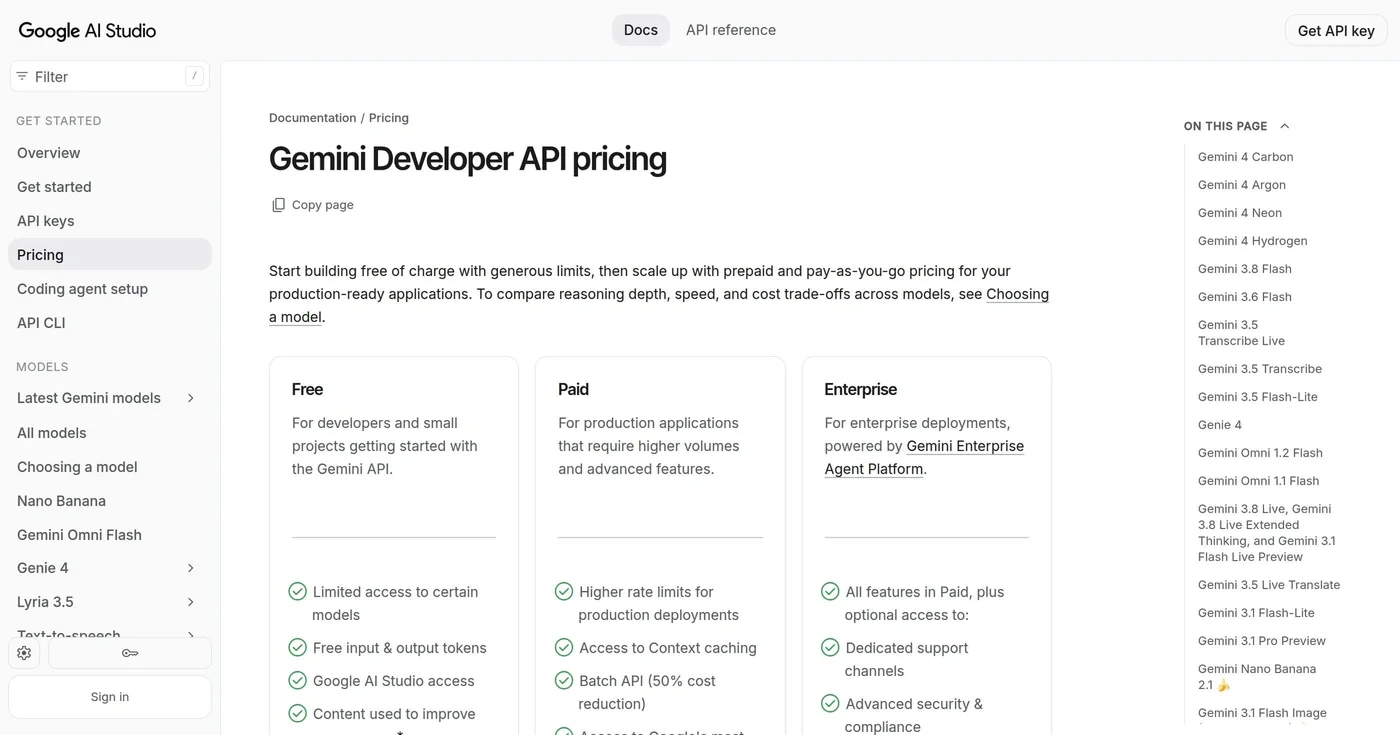
The pricing page describes three commercial tracks. Free is for getting started, with limited model access and free input and output on the models that support it. Paid adds higher limits, context caching, the Batch API at half price, and access to the most advanced models.
On paid, Google says your content is not used to improve its products. On Free, it may be. Enterprise is "powered by Gemini Enterprise Agent Platform," with provisioned throughput, volume discounts and compliance features.
Usage tiers from the rate-limits and billing pages:
Usage tier | Qualification | Billing cap | Spend limit / 10 minutes |
|---|---|---|---|
Free | Active project or free trial; some projects need verification | None | None |
Tier 1 | Link an active billing account | $250 | $10 |
Tier 2 | Paid $100, plus 3 days from the first successful payment | $2,000 | $200 |
Tier 3 | Paid $1,000, plus 30 days from the first successful payment | $20,000 to $100,000+ | $200 |
Tier 2 and Tier 3 qualifications use total cumulative spending on Google Cloud services, including but not limited to this API, for the billing account linked to the project. Free-to-Tier-1 upgrades are typically instant. Later upgrades usually land within 10 minutes.
Prepaid billing is now part of that path. The official billing page says that starting 23 March 2026, new AI Studio users might be required to prepay, and the setup UI tells you if you are. Logan Kilpatrick announced prepaid billing for US customers in April 2026 as the default for new API users.
Hydrogen and Flash-Lite (and several specialized models) offer free input and output on the Free tier. Carbon, Neon and Argon do not.
Grounding with Google Search on Gemini 3 and newer models is not a free-tier feature on those paid models. It starts at 5,000 free search requests per month, shared across Gemini 3 and newer, then $14 per 1,000 requests. The Developer API default cap is 1,500 requests per day per project.
A 429 is not one event. It can mean you hit RPM, TPM or RPD, or a spend-based RESOURCE_EXHAUSTED error from the 10-minute spend cap. Cloud docs for Standard PayGo also say a 429 can mean temporary contention, and the official advice is exponential backoff.
A 503 is different. Google's developer forum guidance, and the Cloud docs, treat 503 as overload, not as your quota running out.
Failed requests that return 400 or 500 are not billed for tokens, but they still count against quota. GetTokens requests are not billed and do not count against inference quota.
If you need more than the default Developer API Search-grounding cap, the official pricing notes point at Vertex AI, which publishes a default quota of 1,000,000 search queries per day. That gap alone is a reason some teams leave the Developer API, which is the next section.
Log token usage from day one. It costs nothing to record, and it feeds the LLM observability stack you will want once agents run unattended.
The most expensive architectural mistake is assuming every Gemini URL is the same product.
Path | Start here when | You get | Watch for |
|---|---|---|---|
You want a key and a first call today | AI Studio keys, Interactions API, official GenAI SDKs, prepaid billing in Studio | Search grounding defaults at 1,500 requests/day; Gemini 4 RPM tables are in Studio, not on the public docs | |
Other teams will depend on this, and you need Cloud governance | IAM, audit logs, provisioned throughput, volume discounts, Model Garden, a 1,000,000/day Search default | Cloud Model Garden lists a 10 percent uplift on non-global regions; do not copy that onto Developer API prices | |
A web or mobile client must call Gemini | App Check, configurable per-user rate limits, Cloud infrastructure | Direct client-side Gen AI SDK calls are for prototyping only |
Alfons Muñoz put the same split in practitioner language on LinkedIn: start on the Gemini Developer API to validate an idea, and move to Vertex AI when other teams will depend on the system. That is consistent with the official Enterprise track on the pricing page.
Headline Gemini 4 unit prices on Model Garden match the Developer API. The Cloud page then adds regional terms the Developer API pricing page does not use. If you are quoting a cost, name which surface it came from.
This is also how the API sits next to other first-party model APIs. The same "start first-party, then decide whether a cloud marketplace or a client SDK is the right door" question shows up in our OpenAI API and Anthropic API guides. For the broader enterprise pattern, see enterprise AI.
Old unrestricted keys are already a rejected or blocked class. If a key is still in a repo, a frontend bundle or a stale preview environment, rotate to an authorization key and restrict the old one before you do anything else.
A model can show up in the Gemini app on a Google AI Pro plan and still be missing from AI Studio and from the API on that same subscription. On r/GoogleGeminiAI, that mix-up is a recurring complaint after a Pro-plan model launch. Check the API model list and your usage tier, not the consumer app picker.
If production still sends gemini-2.5-pro or gemini-2.5-flash, those requests change destination and price on 1 December 2026. Move them on purpose, with evals, rather than inheriting an automatic route.
The $2 / $10 Carbon and Argon rate is promotional through 30 November 2026. A month of experiments at the promo rate is not a 2027 run-rate. Hydrogen and Neon do not have that same cliff.
The official web pathway is explicit: a direct browser call with the Gen AI SDK is a prototype. Production clients should go through a backend or Firebase AI Logic. This is the same class of mistake as committing the key to Git, and it is the one that turns a leaked secret into a project-level bill.
Retries help on transient contention. They do not raise a daily cap, a tier cap or a 10-minute spend limit. If the error is RESOURCE_EXHAUSTED after a spend burst, slow down or request a higher limit; if it is 503, back off because the service is overloaded.
Here is a working sequence that follows the official docs rather than a custom ritual.
Create an authorization key in AI Studio, store it in a secret manager, and set billing alerts before the first paid request. Send gemini-4-hydrogen through the Interactions API with the current GenAI SDK, and log usage on every response.
For a chat or agent loop, use previous_interaction_id so the server holds history, and keep tools and structured outputs on the official built-in list before you invent a parallel orchestration layer. Our prompt engineering guide is the place for the spec and eval habits that sit on top of this API, not a substitute for the official SDK.
When the workload gets harder and a person is waiting, switch the model string to gemini-4-neon. When the job can run in the background, use Carbon or, if you are choosing from Models and Pricing rather than the choosing-a-model table, consider Argon at the same unit price. Overnight evals and dataset passes should go through Batch or Flex inference at half the token cost.
Before 1 December 2026, inventory every 2.5 model ID and every Carbon or Argon dependency. Decide the replacement model, run evals, then change the ID. If Search grounding volume is already bumping into 1,500 requests a day, that is the signal to evaluate Agent Platform rather than to keep retrying 429s.
If the caller is a browser or a mobile app, stop at the prototype and move the key off the device. Firebase AI Logic is the official next step, and its docs already list Gemini 4 Carbon and Argon as available.

Gemini wins on price, storage and Google apps; ChatGPT wins on coding and agent access. Plans, models and team seats compared, checked 27 Nov 2026.

12 AI browsers compared on agent features, privacy, platforms and real prices, with what changed after ChatGPT Atlas and Arc shut down.
OpenAI Symphony turns tracker issues into Codex agent runs. See how it works, which trackers it supports, how to set it up, and where it falls short.
